

Description
WordPress is one of the most widely used content management systems on the internet, making it a frequent target for bots and hackers attempting brute-force attacks.
A brute-force attack works by systematically trying passwords until finding the correct one. Login Delay Shield defends against this by adding a configurable delay after each failed login attempt. Since successful logins are never delayed, legitimate users experience no slowdown. This approach is particularly effective against bots that send thousands of login requests, as each failed attempt forces the attacker to wait before trying the next password.
Features:
- Login delay — Fixed or random delay on failed login attempts (1-10 seconds)
- Progressive delay — Delay increases with each consecutive failed attempt from the same IP
- IP lockout — Temporarily block IP addresses after too many failed attempts
- Username-aware lockout strategy — Choose
IP onlyorIP + usernameto reduce false positives on shared networks - Login feedback — Shows remaining attempts before lockout and a lockout countdown when blocked
- IP whitelist — Bypass all security measures for trusted IPs (supports CIDR notation)
- Email notifications — Receive alerts when failed login thresholds are reached
- Failed login log — Track all failed attempts with a dashboard widget showing recent activity, 7-day trends, and top targeted usernames
- fail2ban logging (optional) — Write fail2ban-compatible failed-login and lockout lines to a safe log file
- XML-RPC protection — Apply delays to XML-RPC authentication or block it entirely
- Custom login URL — Move the login page to a custom URL to reduce automated bot traffic targeting
/wp-login.php - Log retention — Automatic cleanup of old log entries (configurable retention period)
- Accessible admin interface — WCAG 2.1 compliant with keyboard navigation and screen reader support
- Multilingual — Translated into 18 languages including French, German, Spanish, Japanese, Chinese, Arabic, and more
- Lightweight and compatible with other security plugins
This plugin is not a complete security solution — dedicated security plugins offer more comprehensive protection. However, Login Delay Shield adds an effective layer of defense that works alongside your existing security measures without conflict.
Note: This plugin was formerly known as “WP Login Delay”.
Contribute
Found a bug or want to suggest an improvement? Open a thread in the support forum on WordPress.org.
Want to help translate the plugin into your language? Visit translate.wordpress.org.
Screenshots
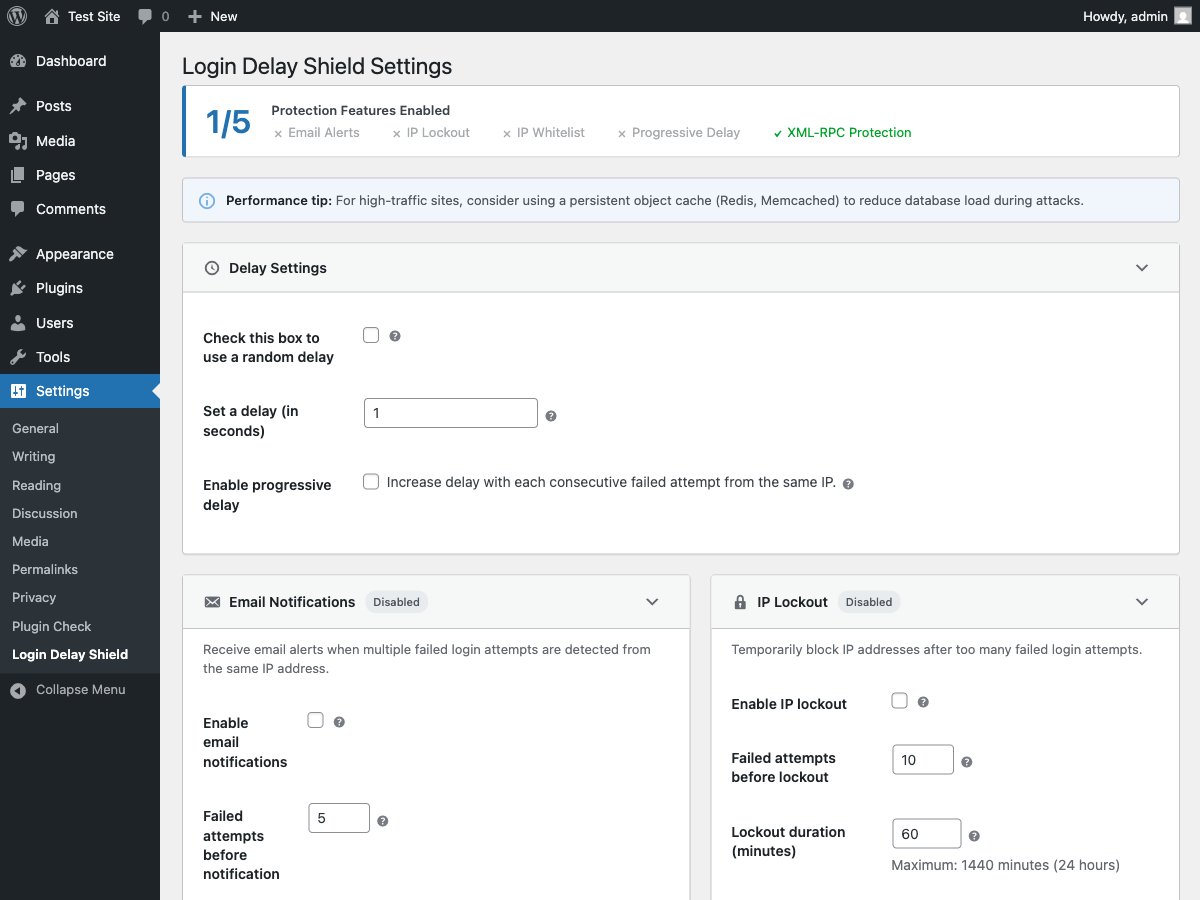
Settings page with delay configuration options. 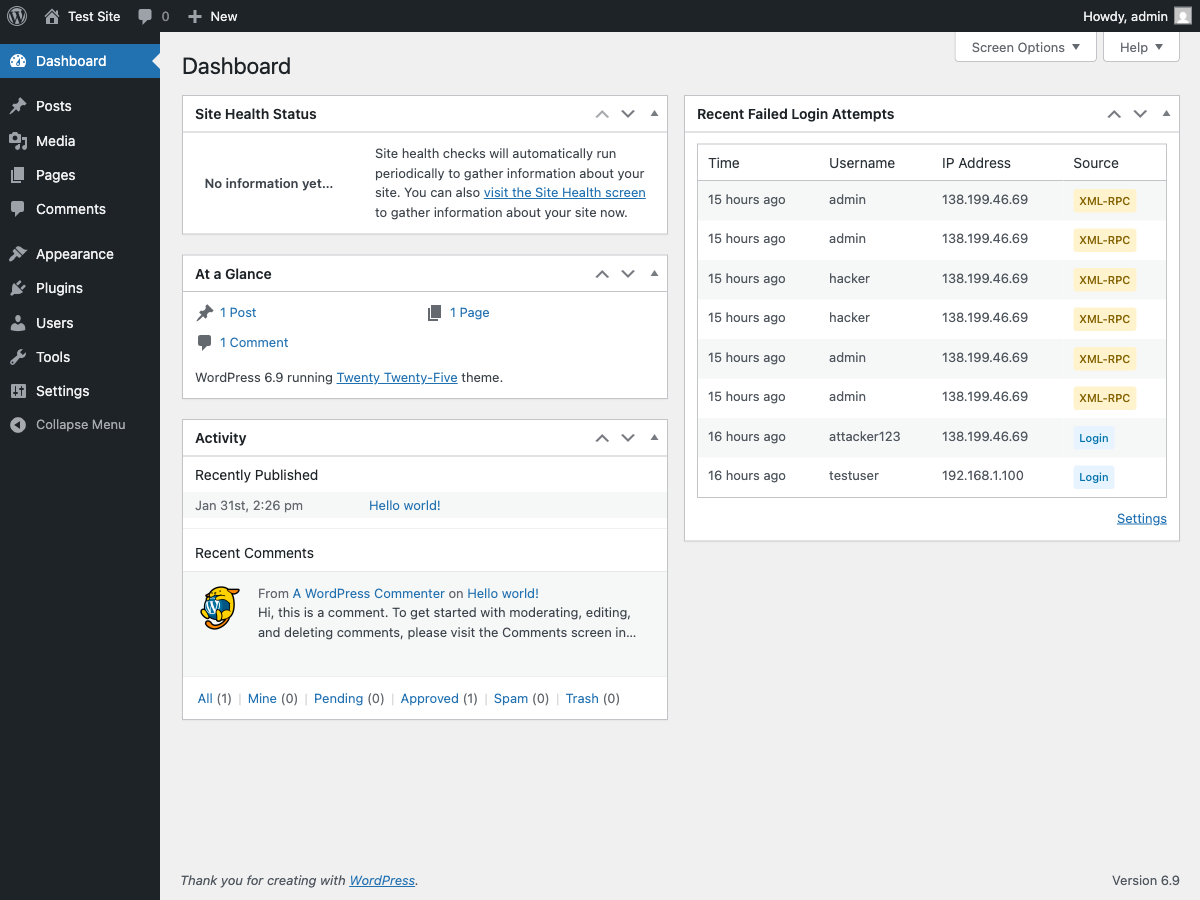
Email notification and IP lockout settings.
Installation
- Upload the
wp-login-delayfolder to the/wp-content/plugins/directory - Activate the plugin through the ‘Plugins’ menu in WordPress
- That’s it, Login Delay Shield is installed and working
FAQ
-
How does this plugin protect my site?
-
When a bot attempts a brute-force attack, it tries thousands of passwords as fast as possible. By adding a delay (even just 1 second) after each failed attempt, the attack becomes impractical. A one-second delay is barely noticeable to legitimate users but makes a huge difference when multiplied across thousands of attempts.
-
Where are the plugin settings?
-
Go to
Settings>Login Delay Shield -
What is progressive delay?
-
Progressive delay increases the wait time with each consecutive failed attempt from the same IP address. For example, the first failure might delay 1 second, the second failure 2 seconds, and so on. This makes repeated attacks increasingly slow.
-
How does IP lockout work?
-
After a configurable number of failed attempts (default: 10), login attempts are temporarily blocked. You can choose whether attempts are counted by
IP onlyor byIP + username(recommended for shared office/mobile IPs). Lockout duration is configurable (default: 60 minutes). -
What are the “attempts remaining” and countdown messages?
-
When lockout is enabled, failed logins show how many attempts remain before temporary lockout. If lockout is triggered, the error message includes a countdown (for example, “try again in 2 minutes”) so users know when to retry.
-
How do I whitelist my own IP?
-
Enable the IP whitelist feature and add your IP address (or a range using CIDR notation like
192.168.1.0/24). Whitelisted IPs bypass all delays and lockouts, ensuring you never lock yourself out. -
Should I block XML-RPC?
-
If you don’t use the WordPress mobile app or remote publishing tools like Windows Live Writer, blocking XML-RPC authentication removes a common attack vector. You can also choose to just apply delays without blocking it entirely.
-
How do email notifications work?
-
When enabled, the plugin tracks failed login attempts per IP address. Once the threshold is reached (default: 5 attempts), an email is sent to alert you. The counter resets after one hour of no failed attempts from that IP.
-
Where can I see failed login attempts?
-
A dashboard widget shows the 10 most recent failed login attempts, including the time, username attempted, IP address, and source. It also includes a lightweight 7-day trends panel with daily totals, top sources, top IPs, and top targeted usernames.
-
How do I use fail2ban logging?
-
Enable fail2ban logging under
Settings>Login Delay Shield>Login Log. If the log path is empty, Login Delay Shield writes tologin-delay-shield-fail2ban/login-delay-shield-fail2ban.login a plugin-owned temporary directory outside the WordPress uploads tree and adds basic.htaccess/index.htmlprotections. Custom paths are restricted to the protected default directory by default; use thewldelay_fail2ban_allowed_log_dirsfilter only for server-protected directories. If a custom path is rejected, logging is disabled instead of silently writing somewhere else. If lockout-event logging is enabled, an attempt that triggers a lockout may produce both afailed loginline and alockoutline, so tune your jail’smaxretryaccordingly.Log lines include an ISO-8601 timestamp, stable prefix, and fields such as:
2026-05-04T12:00:00+00:00 Login Delay Shield: failed login source=wp-login ip=203.0.113.10 username=adminA fail2ban filter can match the IP with a regex like:
failregex = Login Delay Shield: (?:failed login|lockout) .* ip=<HOST> -
Is the admin interface accessible?
-
Yes! Login Delay Shield follows WCAG 2.1 accessibility guidelines. All settings are fully keyboard navigable, screen reader compatible, and include proper ARIA attributes. Collapsible sections can be toggled with Enter or Space keys, tooltips appear on focus (not just hover), and all dynamic changes are announced to assistive technologies.
-
Does this plugin work better with an object cache?
-
For high-traffic sites or sites experiencing frequent attacks, we recommend using a persistent object cache like Redis or Memcached.
The plugin uses WordPress transients to track failed login attempts and lockouts per IP address. By default, transients are stored in the database. During a distributed brute-force attack (many IPs), this can create additional database queries.
With an object cache installed:
- Transient reads/writes go to memory instead of the database
- Much faster performance under attack conditions
- Reduced database load
Popular object cache plugins: Redis Object Cache, W3 Total Cache, LiteSpeed Cache.
Most managed WordPress hosts (WP Engine, Kinsta, Flywheel) include object caching by default.
-
What languages are supported?
-
Login Delay Shield is translated into 18 languages:
- English (default)
- Arabic (العربية)
- Chinese Simplified (简体中文)
- Czech (Čeština)
- Dutch (Nederlands)
- French (Français)
- German (Deutsch)
- Indonesian (Bahasa Indonesia)
- Italian (Italiano)
- Japanese (日本語)
- Korean (한국어)
- Polish (Polski)
- Portuguese – Brazil (Português do Brasil)
- Russian (Русский)
- Spanish (Español)
- Swedish (Svenska)
- Thai (ไทย)
- Turkish (Türkçe)
- Vietnamese (Tiếng Việt)
The plugin automatically uses your site’s language setting. Want to help translate into another language? Visit translate.wordpress.org.
Reviews

Contributors & Developers
“Login Delay Shield” is open source software. The following people have contributed to this plugin.
Contributors
Translate “Login Delay Shield” into your language.
Interested in development?
Browse the code, check out the SVN repository, or subscribe to the development log by RSS.
Changelog
2.3.1
Patch release with CI fixes and new telemetry feature.
New Features:
* Added “Top target pairs” card to telemetry — ranks the most common IP + username combinations from failed login attempts for faster incident triage.
Bug Fixes:
* Fixed unit tests failing in CI due to unmocked get_option() calls in fail2ban and sanitization test suites.
* Fixed wp plugin check failing in CI because the plugin-check plugin was not activated before use.
2.3.0
Performance, UX, architecture, and CI improvements.
New Features:
* Security Health Score — 0-100 score card on the settings page showing protection posture with “next recommended” guidance.
* “What’s New” banner — dismissible notice after plugin upgrade highlighting new features.
* Referral card — “Leave a review” and “Get support” links in the dashboard widget.
* Contextual help links — tooltip system now supports optional “Learn more” URLs linking to documentation.
* Pluggable username normalization — wldelay_normalize_username filter hook for LDAP, email-as-login, and SSO backends.
* CI/CD test pipeline — GitHub Actions workflow running PHPUnit and wp plugin check on every push and PR.
Performance:
* Whitelist IP validation optimization — exact IPs checked via O(1) hash lookup; CIDR ranges iterated only on miss. Cached per-request.
* Telemetry pagination drift detection — snapshot hash warns when data changes between pages during active attacks.
2.2.4
Top targeted usernames in login telemetry and hardening.
New Features:
* Added “Top usernames” card to the telemetry summary — ranks the most-targeted usernames by failed login attempts with description text for admin context.
Improvements:
* Added database index on the username column for faster GROUP BY queries at scale.
* Username aggregation excludes NULL, empty, and whitespace-only values using parameterized TRIM filter.
* Expanded PHPDoc return types for wldelay_get_login_log_summary() with full nested array structures.
* Updated readme feature list and FAQ to mention top targeted usernames.
2.2.3
Complete Custom Login URL runtime, Trend Analytics queries, and bug fixes.
New Features:
* Custom Login URL runtime — custom slug now fully functional with login, logout, lost password, and password reset all routed through the custom URL.
* Custom Login URL admin UI — settings card with enable/disable toggle, slug input, status badge, and tooltip help.
* Trend Analytics query functions — wldelay_get_top_ips(), wldelay_get_top_usernames(), and wldelay_get_daily_attempts() for dashboard trend data.
Bug Fixes:
* Fixed double wp_unslash() on login username that could corrupt usernames with literal backslashes.
* Fixed wp_login_url filter name (was wp_login_url, should be login_url) preventing URL rewriting.
* Fixed canonical redirect leaking custom login slug via 302 when /wp-login.php is accessed through the front controller.
* Fixed login_init blocking internal WordPress paths (e.g. /wp/wp-login.php) used for legitimate auth redirects.
Improvements:
* Expanded reserved slug list with wp-json, wp-content, wp-includes, wp-signup, wp-activate, xmlrpc, feed, robots, sitemap.
* Replaced production wldelay_unlock_current_ip_should_exit filter with WP_TESTS_DOMAIN constant check — no longer exposes a testability surface in production.
* Wrapped Custom Login URL section titles in esc_html__() for i18n completeness.
* Added Custom Login URL to the protection features summary box.
* Added Playwright end-to-end tests for full Custom Login URL verification.
2.2.2
Micro-hardening — input sanitization, i18n completeness, and code documentation.
Improvements:
* Added wp_unslash() before sanitize_user() in login username extraction to correctly handle WordPress magic-quote slashes.
* Wrapped email notification subject and body in __() for full i18n/l10n support.
* Added detailed inline comments explaining the IPv6 CIDR binary mask bit-shift logic.
2.2.1
Code housekeeping — JavaScript extraction and admin UI consistency.
Improvements:
* Extracted all inline JavaScript from the settings page view into a standalone admin.js file, loaded via wp_enqueue_script().
* Used wp_localize_script() to pass PHP-side translatable strings to JavaScript (Enabled/Disabled badge labels).
* Standardized <label> association across all settings field callbacks.
* Removed unused data-section attributes from settings card elements.
2.2.0
Adds Custom Login URL — the last major unimplemented roadmap feature.
New Features:
* Custom Login URL — optionally move the WordPress login page to a configurable slug (e.g., /my-login). When enabled, direct access to wp-login.php is blocked and all auth flows (login, logout, lost password, password reset) are routed through the custom slug.
* Emergency recovery bypass — define WLDELAY_DISABLE_CUSTOM_LOGIN in wp-config.php to restore access to wp-login.php without disabling the plugin.
* WP-CLI, cron, and REST API contexts are automatically excluded from custom login routing.
* All WordPress URL generation functions (wp_login_url, logout_url, lostpassword_url) and password-reset emails are transparently updated to use the custom slug.
Improvements:
* New settings card for Custom Login URL in the admin UI, following existing WCAG 2.1 AA accessibility patterns.
* Custom Login URL feature appears in the protection status summary box.
* Rewrite rules are automatically flushed when the slug or enabled state changes.
2.1.6
Small release focused on dashboard observability, admin polish, and release metadata improvements.
New Features:
* Added a lightweight failed-login trends panel to the dashboard widget with 7-day activity, top sources, and top IPs.
Improvements:
* Updated the dashboard widget cache to store both recent attempts and trend snapshots while remaining backward-compatible with the previous cache format.
* Updated the WordPress.org listing metadata, including a more accurate minimum PHP version and refreshed tags.
* Extracted admin inline JavaScript into a dedicated file for easier maintenance.
* Standardized settings checkbox rendering for a more consistent admin UI.
* Added input unslashing before username normalization for safer WordPress-style request handling.
2.1.5
Patch release focused on safer defaults for migrated/legacy installs.
Improvements:
* Hardened REST and application-password protection toggles when related option keys are missing.
* Preserves behavior for sites with explicitly saved toggle values while avoiding unintended strict defaults on legacy option states.
2.1.4
Adds 2FA health check notice and code quality improvements.
New Features:
* 2FA health check notice on the settings page — detects common 2FA plugins (Two-Factor, WP 2FA, miniOrange, Google Authenticator) and reminds administrators to verify coverage.
* Extensible wldelay_2fa_providers filter hook for adding custom 2FA provider detection.
Improvements:
* CSV export now uses the dedicated request filter reader for consistency and safer parameter handling.
* Renamed 2FA notice CSS class to wldelay-health-notice for clearer semantics.
* Removed 1=1 WHERE sentinel from query builder in favour of conditional clause construction.
* Hardened wldelay_2fa_providers filter callback with type validation to guard against malformed return values.
2.1.3
Adds telemetry log filters and hardens the CSV export.
New Features:
* Telemetry log filters — filter failed login attempts by source, IP, username, and date range.
* Filtered CSV export — export only the subset of log entries matching the active filters.
Improvements:
* CSV export now streams results in batches to prevent memory exhaustion on large log tables.
* Added database index on the source column for faster filtered queries.
* Hardened query builder to always use $wpdb->prepare() for defense-in-depth.
* Restricted request parameter reading to expected wldelay_log_* keys only.
2.1.2
Feature and bugfix release.
New Features:
* CSV export for the failed login log — download attempts as a CSV file directly from the dashboard widget.
* Optional REST API and application-password authentication protection toggles.
Bug Fixes:
* Fixed REST protection staying active even when application passwords are unavailable.
* Lockout flush recovery now correctly clears failure counters alongside lockout transients.
Improvements:
* Stabilized integration test suite and improved CSV export test reliability.
2.1.1
Patch release focused on lockout recovery tooling.
New Features:
* Added an admin recovery action: Unlock Current IP button in settings (nonce + capability protected).
* Added WP-CLI recovery commands:
* wp login-delay-shield unlock-ip <ip>
* wp login-delay-shield flush-lockouts
* Added optional protection toggles for REST API and application-password authentication paths.
Improvements:
* Added integration tests covering lockout recovery helpers and unlock URL generation.
* Failed-attempt logs now include dedicated source values for REST (rest) and application-password (application-password) auth failures.
2.1.0
Minor release focused on smarter throttling and lockout behavior.
New Security Feature:
* Username-aware throttling and lockout strategy — choose between IP only and IP + username to reduce false positives on shared networks.
* Login feedback messages — show remaining attempts before lockout and a lockout countdown when blocked.
Improvements:
* Added lockout strategy control to the admin settings UI.
* Progressive delay now continues tracking failed attempts when enabled, even if email notifications and lockout are disabled.
* Expanded test coverage for strategy sanitization and username-isolated lockout behavior.
2.0.0
Major release with comprehensive security features and modern admin interface.
New Security Features:
* Progressive delay — increases wait time with each consecutive failed attempt from the same IP
* IP lockout — temporarily blocks IP addresses after configurable number of failures
* IP whitelist — bypass all security for trusted IPs with CIDR notation support (e.g., 192.168.1.0/24)
* XML-RPC protection — apply delays to XML-RPC authentication or block it entirely
* Email notifications — alerts when failed login thresholds are reached, with rate limiting to prevent inbox flooding
* Failed login log — database-backed logging with dashboard widget showing recent activity
* Configurable log retention — automatic cleanup of old entries (1-365 days or keep forever)
Improved Delay System:
* Delays now only apply to failed logins — successful logins are always instant
* Configurable random delay range — set custom min/max values (1-10 seconds)
* Smart delay — successful logins bypass all delays for seamless user experience
Admin Interface:
* Completely redesigned settings page with collapsible sections
* Real-time status badges showing which features are active
* Protection summary box for quick security overview
* WCAG 2.1 Level AA accessible — full keyboard navigation and screen reader support
Internationalization:
* Translated into 18 languages: Arabic, Chinese (Simplified), Czech, Dutch, French, German, Indonesian, Italian, Japanese, Korean, Polish, Portuguese (Brazil), Russian, Spanish, Swedish, Thai, Turkish, and Vietnamese
Performance & Reliability:
* Batched log cleanup for large tables — prevents database locks
* Improved proxy header handling with proper whitespace trimming
* Options caching for reduced database queries
* Compatible with object caches (Redis, Memcached) for high-traffic sites
Other Improvements:
* Renamed from “WP Login Delay” to “Login Delay Shield”
* WordPress 6.9 compatibility
* PHP 8.x compatibility
* Comprehensive test suite
1.5
- Added support until WordPress 5.7.2
- Remove the word WordPress from the plugin name
1.4
- Added setting to use a random delay between 1 and 5 seconds
1.3.1
- Added support until WordPress 4.8.2
1.3
- Wrong SVN commands to push plugin update to WordPress repository
1.2
- Fixed the invalid header issue after installation
1.1
- Updated the readme file for WordPress 3.8
- Renamed a function of the plugin to avoid conflict with WooCommerce plugin
- Added a setting under “Settings > Login Delay Shield” to set the delay time in seconds (the default value is one second)
1.0
- First version of the plugin